Administración Remota de Servidores#
SSH (Secure SHell Protocol) es un protocolo de red criptográfico, para administrar servidores remotos de forma segura a traves de una red insegura.
Las aplicaciones de SSH están basadas en una arquitectura de cliente‑servidor, un cliente ssh se conecta a un servidor ssh.
SSH permite copiar datos de forma segura haciendo uso de sftp, scp, o rsync.
Conexión de SSH#
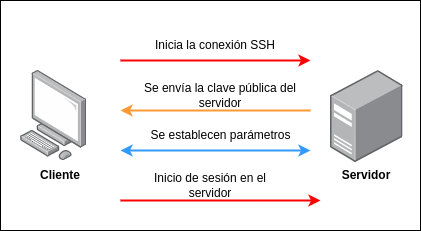
Conexión a un servidor remoto#
Inicio de sesión sin contraseña#
Generando un par de llaves
[student@workstation ~]$ ssh-keygen
Generating public/private rsa key pair.
Enter file in which to save the key (/home/student/.ssh/id_rsa):
Created directory '/home/student/.ssh'.
Enter passphrase (empty for no passphrase):
Enter same passphrase again:
Your identification has been saved in /home/student/.ssh/id_rsa.
Your public key has been saved in /home/student/.ssh/id_rsa.pub.
The key fingerprint is:
SHA256:afJ+LT08oD7YVvs1CjXafQ4bqO1Qj7Q1MpWh2EQVXYk student@nas.pera.gt
The key's randomart image is:
+---[RSA 3072]----+
| .o.=o+|
| + E +.|
| . o o |
| . . |
| . S B o |
| + o* @ . |
| o.o+*= B .|
| ..= +=*o B |
| ooo.+=o. .|
+----[SHA256]-----+
[student@workstation ~]$
Copiando la llave hacia el servidor de SSH
[student@workstation ~]$ ssh-copy-id root@192.168.110.100
/usr/bin/ssh-copy-id: INFO: Source of key(s) to be installed:
"/home/student/.ssh/id_rsa.pub"↪
The authenticity of host '192.168.111.254 (192.168.111.254)' can't be
established.↪
RSA key fingerprint is SHA256:D+1cJ+J3E9Q+t/+QLy+quyzG7iLfWdNg8LdwrM/FxRE.
Are you sure you want to continue connecting (yes/no/[fingerprint])? yes
/usr/bin/ssh-copy-id: INFO: attempting to log in with the new key(s), to
filter out any that are already installed↪
/usr/bin/ssh-copy-id: INFO: 1 key(s) remain to be installed -- if you are
prompted now it is to install the new keys↪
root@192.168.111.254's password:
Number of key(s) added: 1
Now try logging into the machine, with: "ssh 'root@192.168.110.100'"
and check to make sure that only the key(s) you wanted were added.
Inicio de sesión
Rsync#
Es una herramienta para copia de archivos de forma remota y a travéz de SSH y otros protocolos, primordialmente sirve para sincronizar el contenido de directorios.
Syntaxis#


SCP#
Es una herramienta para copia de archivos de forma remote a travéz de SSH.
Syntaxis#


Configuración de Servidor SSH#
El archivo de configuración del servidor de SSH se encuentra en /etc/ssh/sshd_config y se puede editar solamente con el usuario root.
Hardening Básico#
Evitar que root inicie sesión de forma remota.
Inicio de sesión unicamente con llave.
Restringir la cantidad de intentos de inicio de sesión
SSH Audit#
Es un programa escrito en python que permite auditar configuraciones de cliente y servidor de SSH.
Instalación de ssh-audit#
dnf install python3
curl -LO 'https://github.com/jtesta/ssh-audit/releases/download/v2.5.0/ssh-audit-2.5.0.tar.gz'
tar -xf ssh-audit-2.5.0.tar.gz
Auditar servidor SSH#
Auditar cliente SSH#
Local#
Se requiren 2 shell para realizar la auditoria del cliente de SSH.
Servidor#
Cliente#
Remoto#
Para realizar las pruebas de auditoria del cliente y servidor en linea debemos acceder a www.sshaudit.com.
Cliente#
Hacer click en el botón Begin Client Audit.

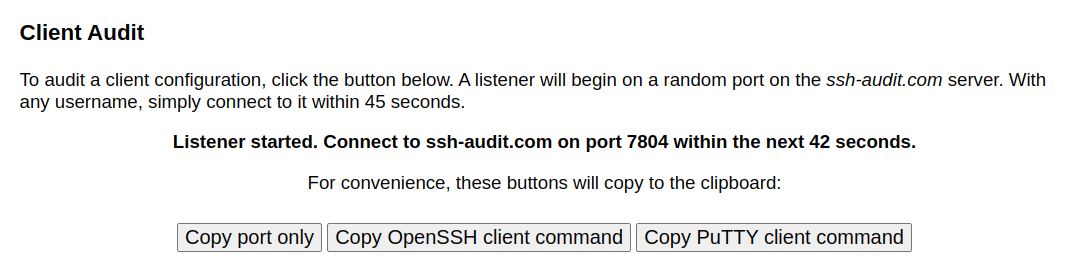
Ejecutar
Donde el puerto varia con cada utilización.Resultado
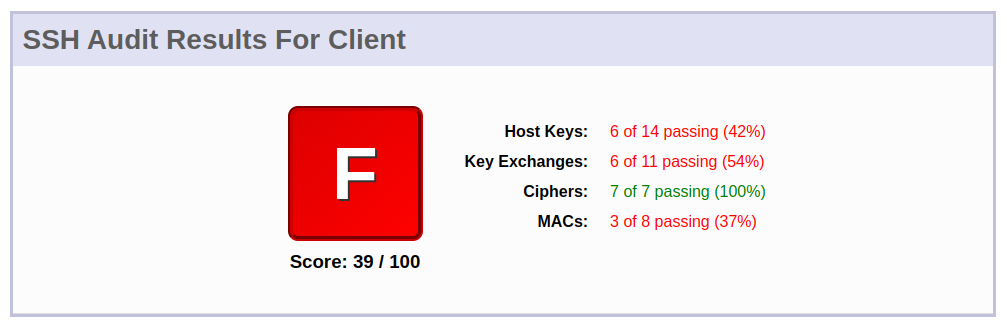
Servidor#
Se debe colocar la ip pública en la caja de texto Target SSH Server el puerto en Port y por último hacer click en Scan
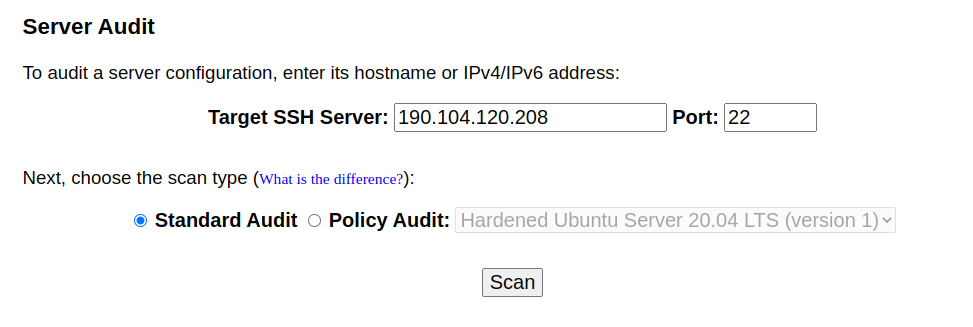
Guias de Hardening SSH-AUDIT#
Nota: la version de ssh-audit puede variar y se puede consultar en el repositorio oficial de github ssh-audit.